
28 Fatta eccezione per i piccoli dispositivi mobili, i controlli non vanno posizionati al centro dove invece devono stare i contenuti
Sintesi del contesto di applicazione
Situazione: normale utilizzo dell'interfaccia.
Problema: l'utente non utilizza alcuni controlli perché li confonde con i contenuti. |
Accorgimenti in sede progettuale: Destinare la parte centrale ai contenuti e le laterali ai controlli
|
Stato dell'analisi
 Manca l'applicazione ai prodotti.
Applicazione del principio
Nelle interfacce di pagine web destinate a dispositivi di grandi dimensioni come computer è importante capire dove inserire i comandi e gli strumenti senza interferire sul tema principale.
Un ottimo esempio è l’interfaccia di photoshop (fig.01) la quale fornisce agli esperti che ne fanno uso tutti i comandi necessari lasciando l’immagine, che è il punto chiave del progetto, al centro dell’interfaccia.
f.01
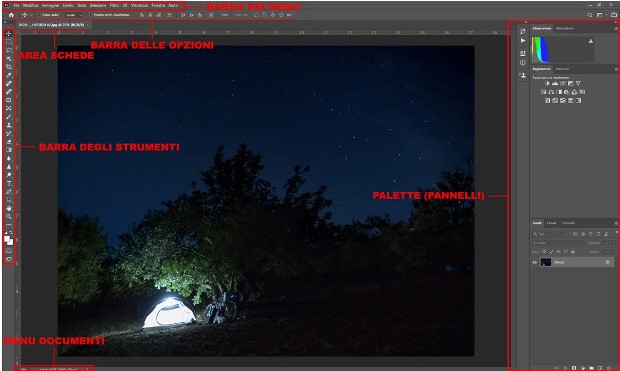 fig.01
Enunciato originale del principio
Smartphone and tablet controls are sometimes forced into the content area because the screens are so small, that’s the only area there is. Even there, you need to provide a standard trigger, such as a tap in the middle of the content area, that will simultaneously expose all the icons and buttons representing all the hidden controls so that users don’t have to carry out a treasure hunt.
In web pages and cloud-based applications, the first "inside-out" applications appeared inside web browsers as independent developers struggled to create complex sites and apps within the confines of a simple window in a simple tool designed for simple browsing of static pages. Even though the basic paradigm was shown inadequate by 1996, nothing at all has been done by standards committees to address the needs of these developers.
Developers working on complex sites and cloud-based web applications deserve access to the browser’s menu bar. That they don’t already have it is a continuing scandal. Imagine your boss telling you to whip up a competitor to Photoshop that uses Microsoft Word’s menu bar. The first words out of your mouth would be, "but that would mean I’d have to put all my menus in the content area of the window where the user’s image needs to be!" Insane, right? Yet that’s just what we do every time we create a web page.
On laptop and desktop computers, controls, and, in particular, hidden controls have no place inside the content area
(fonte: Bruce Tognazzini, First Principles of Interaction Design)

pagina visitata 217 volte dal
27/10/2023